
Enable your AI agents with human employee context within existing tech stack
Maya turns authorised workforce and workflow information into governed human context for approved AI agents. Your existing platforms remain the systems of record, access controls stay in place, and employees retain responsibility for decisions that require human judgement.
Maya connects across 12,000+ applications and data sources with 99.9% uptime. Give approved AI agents real time access to enterprise context, tools and workflows through a governed MCP layer, while preserving identity, permissions and human decision rights.
Human context across your stack
Your HR, CRM, workflow, collaboration and knowledge systems contain the operational information that keeps work moving. Maya uses authorised information from these systems to build the human context required for a specific employee and workflow. Approved AI agents can then use that context to understand responsibilities, preferences, review requirements and decision boundaries while the work is taking place.
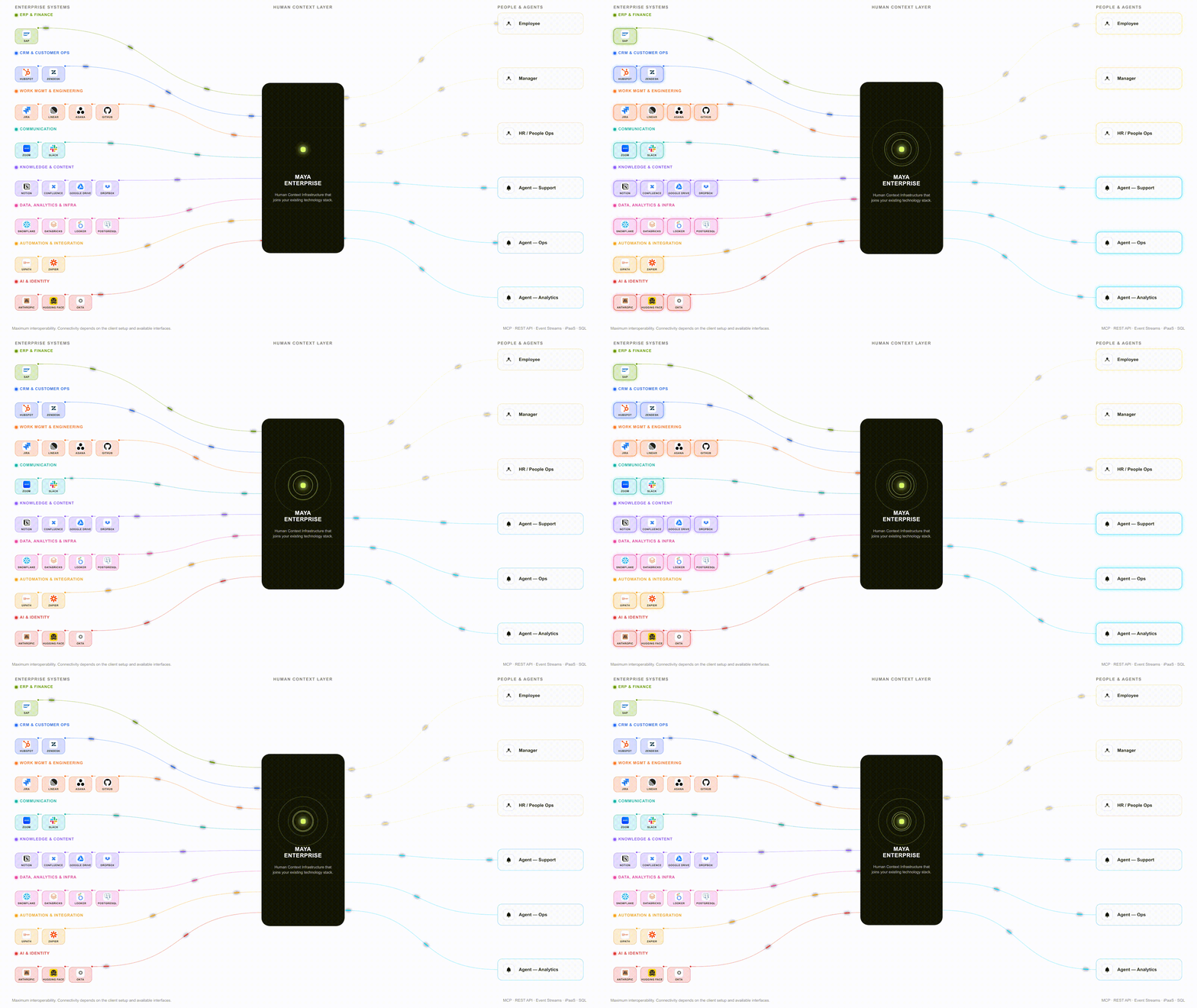
1. Connect approved enterprise systems
Maya works with authorised sources across HR, CRM, ERP, workflow, collaboration, knowledge and data platforms.
750k+ reusable enterprise recipes and skills
100M+ automated tasks
300k+ endpoints across connected enterprise systems
2. Create relevant
human context
Maya combines approved enterprise information with context about the employee, their responsibilities and the work they are performing.
90% role matching accuracy
35% improvement in workforce planning accuracy
100% of AI generated insights validated for accuracy, coherence and safety
3. Serve context to
AI agents
Agents receive the context permitted for the employee and workflow, rather than unrestricted access to employee information.
97% routing accuracy
80% of employee requests answered through Slack, Teams, and other systems you run
10x faster across reporting, workflows and administration
4. Preserve human
employee control
The enterprise defines where AI can act, where employee review is required and where decisions must remain with people.
60K agent sessions governed daily
100% of agent activity automatically logged
60% more efficient human review
An AI agent can know which document to read and which task to complete. It will not know how to work with the employee responsible for the outcome.
-
Maya helps agents understand an employee’s role, responsibilities and the work they are accountable for.
70% faster matching of people to roles
-
Maya gives agents context on how employees prefer to receive information, guidance and support.
38% less manager admin time
-
Maya defines which actions an agent can perform and which outputs require human review.
30% reduction in operational risk exposure
-
Maya makes clear which decisions remain with employees and when an agent should request input or escalate.
64% fewer escalations to HR
The goal is not to give AI more information, but to give each agent the right context to work effectively with each employee.
Agents can act. Enterprise control stays in place.
Connecting an agent to an enterprise system should not give it unrestricted authority. Maya carries identity, permissions and decision rules into the workflow so agents operate inside defined boundaries.
-
Agent actions can use authenticated user identity and existing permissions.
2k+ technical evaluations of agent behaviour
-
Control which users and agents can access specific systems, tools and actions.
Maya provides 50+ governance and operational controls
-
Pause sensitive actions for authorised review before execution.
1.7x more errors found in AI assisted work without the right review controls
-
Define what AI may execute, what remains a human decision and when escalation is required.
With Maya, enterprises spent 75% less time on multi step workflows

Help your systems work better with your people
Maya helps approved AI agents understand employee responsibilities, working preferences, decision rights and review requirements. It works with the systems your organisation already uses, giving people and AI agents clearer context to coordinate work while keeping human control in place.